
Report Writing Software for Psychologists: Meet Psynth’s New Report Editor


A generated draft is not a finished psychological report. It still needs a psychologist to interrogate the language, refine the interpretation, shape the document for its readers, and decide what belongs in the final record.
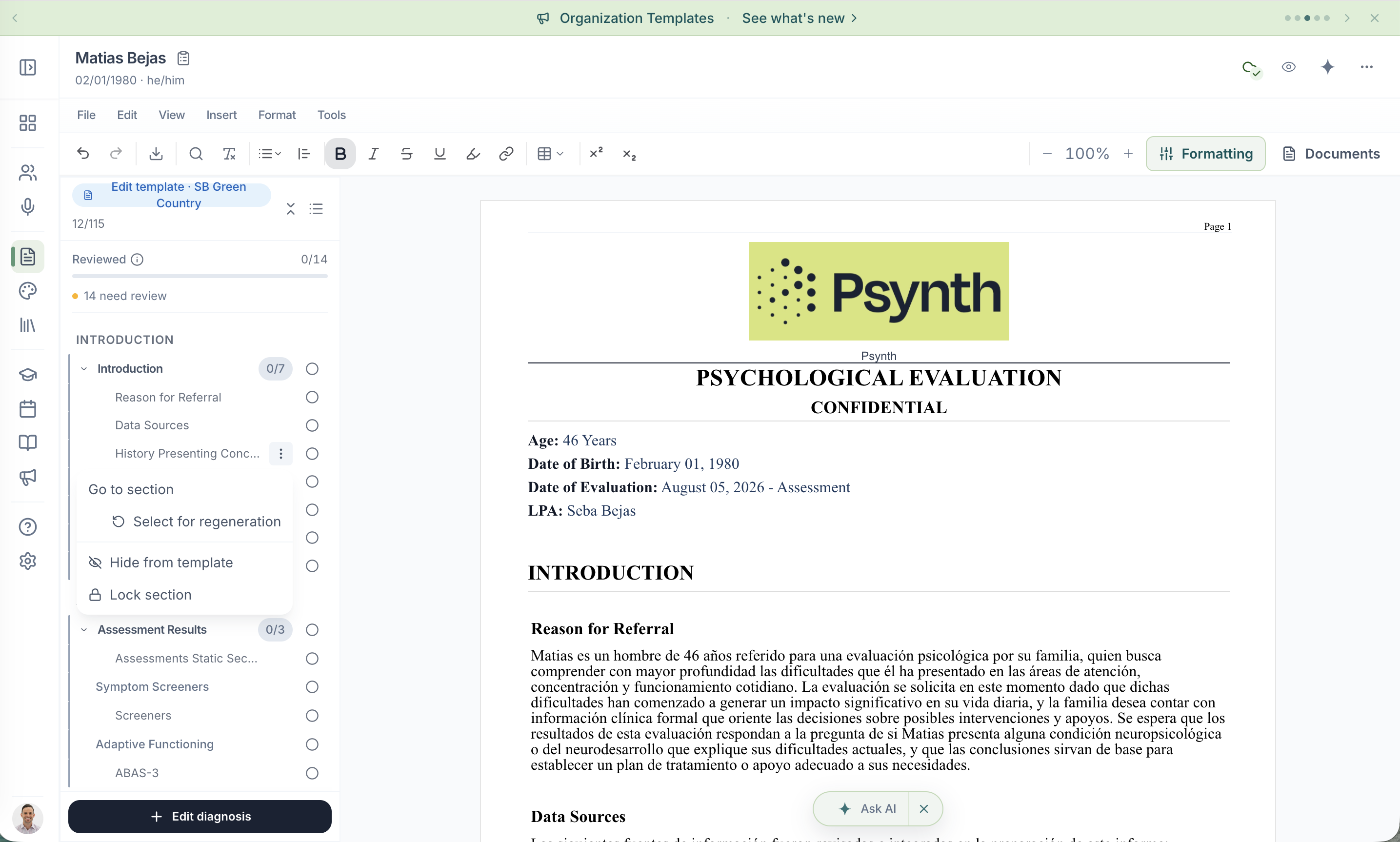
Psynth’s new Report Editor, now live, is built around that part of the job. Psychologists can review sections as they appear, regenerate one or several sections without starting over, protect completed work from document-triggered regeneration, and control the structure and presentation of the finished report.
For assessment practices, the editor also supports a more consistent foundation across the organization through shared templates, controlled template management, and reusable report styles without taking authorship away from the psychologist responsible for the report.
Explore the new Report Editor
What is Psynth’s new Report Editor?
Psynth’s Report Editor is a clinician-controlled workspace for psychologists to review, edit, format, selectively regenerate, and export psychological reports. It gives clinicians more precise control after a draft has been generated; it does not replace their interpretation, review, approval, or sign-off.
A useful first draft may reduce the blank-page burden. It cannot decide whether a statement is supported, whether an interpretation is appropriate, or whether an explanation will make sense to a parent, school, referrer, or another clinician. The new editor keeps those decisions where they belong: with the psychologist.
Start reviewing before the entire report is ready
Psychological reports are long documents. Waiting for every section to finish before reviewing any of them creates an unnecessary bottleneck.
In the new editor, report sections can appear as generation progresses. When a section is ready, you can read it in context and begin reviewing it while the rest of the report continues to take shape. Clear generation states show what is available and what is still in progress.
That visibility makes it easier to focus your attention. One section may need a factual correction; another may need a clearer explanation for its intended reader; a third may require a different emphasis based on your clinical judgment. Each remains draft material until you decide it is ready.
Regenerate the sections that need another pass, not the whole report
A change in one part of a report should not automatically force you to reopen every part.
Psynth lets you regenerate an individual section or select multiple sections when the same instruction applies to each of them. This keeps the revision focused. You can ask for a different treatment of the relevant material without discarding unrelated sections that are already working.
Selective regeneration is especially useful when an edit affects several connected sections. For example, when terminology, tone, or an explanatory point needs to remain consistent across the document. The resulting text is still a draft: the psychologist reviews it, edits it, and decides whether to use it.
Lock completed sections without giving up control
Once a section is where you want it, you can lock it. A locked section is skipped when the document triggers regeneration, helping protect work you have already reviewed.
The lock is deliberately a safeguard rather than an absolute barrier. You can still choose to regenerate a locked section manually when a later clinical or editorial decision requires it. In other words, Psynth helps prevent an unintended rewrite without preventing a deliberate one.
This distinction matters in a long report. It lets you move forward with greater confidence that completed sections will remain intact while preserving your ability to revisit them when the case calls for it.
Create a consistent reporting foundation across the organization
Consistency across a practice should not depend on every psychologist independently recreating the same structure.
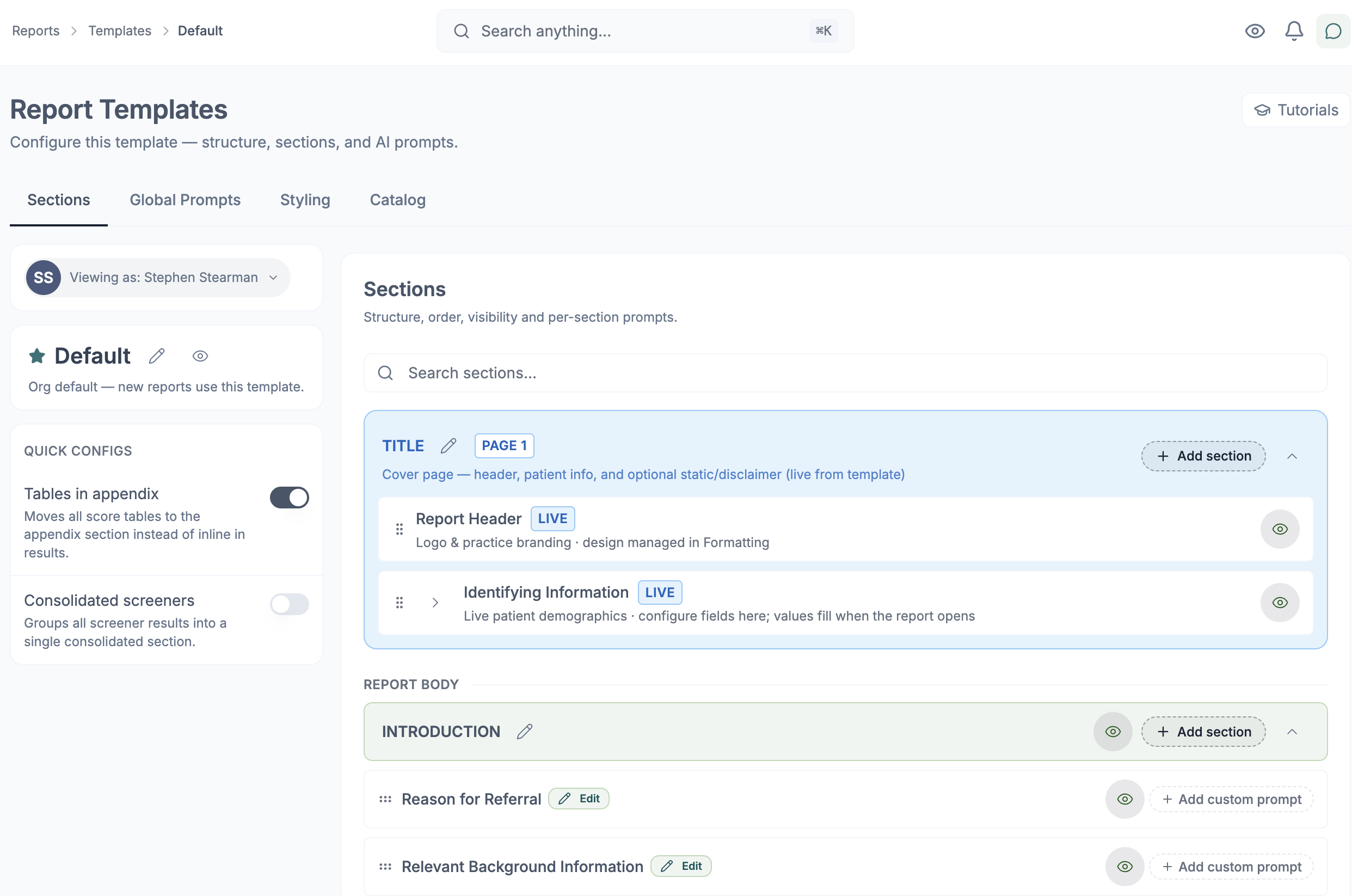
Psynth supports organization templates that can be published for shared use and locked when an approved structure needs to remain protected. Granular role-based access controls let an organization determine who can maintain those shared templates and who can use them in day-to-day report work.
Within Report Templates, the Header, Subheader, and Identifying Information are now controlled at the template level. This lets a practice establish reusable report-wide elements for a particular report type, contract, or presentation requirement. Their formatting remains available within the report under Formatting.
The result is a practical division of responsibility: authorized template managers maintain the shared framework, while the psychologist reviewing a specific report remains responsible for its clinical content and final form.

Maintain distinct styles for different reporting needs
One practice may need several legitimate report presentations. A psychoeducational report may not look like an autism evaluation; one contract may require a different header or presentation from another.
Under Report Look in Formatting, Style Panes let you create multiple report styles. Instead of rebuilding the document’s appearance each time, you can begin with a style suited to the report type, contract, or audience and then review the specific document before export.
Edit with practical document controls
The new workspace brings key presentation controls into the report-editing experience:
- typography, alignment, and spacing;
- headings and dividers;
- tables;
- covers; and
- signatures.
These are not decorative extras in a psychological report. Heading hierarchy helps readers navigate a long document. Spacing and table presentation affect whether results can be understood. Covers and signature areas form part of the professional document delivered to its audience.
Tables can be reviewed and formatted alongside the surrounding narrative. As with every other part of the report, psychologists should confirm that both their content and presentation are correct before export.
Move from editor to export with fewer surprises
Psynth has improved report and table rendering so the exported document more closely reflects what you see while editing. That closer correspondence is particularly helpful in reports with tables, structured headings, and other presentation-sensitive elements.
The release also strengthens report loading, saving, regeneration, and export recovery. These improvements support a steadier path through the several rounds of review a long report may require.
A final export check still matters. Open the finished document, inspect the layout and content that matter for the case, and make any necessary corrections before delivery. Better correspondence between editor and export should make that check more predictable, not make it optional.
More control between the first draft and the final report
The new Report Editor is not built around a single “generate and accept” moment. It is built for the decisions that follow: what to revise, what to preserve, how to maintain practice standards, and when the report is ready to carry the psychologist’s name.
Psynth’s new Report Editor is now live. Explore the editor and see how section-level control, shared templates, practical formatting, and more dependable export fit into your reporting workflow.
If your assessment workflow begins with a consented conversation, read how Psynth Ambient Listening supports capture confidence and clinician-reviewed notes. For information about sensitive data, review Psynth’s privacy and security guidance.
Frequently Asked Questions
What is Psynth’s new Report Editor?
Psynth’s new Report Editor is a workspace for psychologists to review, edit, format, selectively regenerate, and export psychological reports. It gives clinicians more control after a draft is generated; it does not replace their judgment, approval, or sign-off.
Can I review a report while it is being generated?
Yes. Report sections can appear as generation progresses, so you can begin reviewing available sections while the rest of the report continues to take shape. Each section remains draft material until a psychologist reviews and approves it.
Can I regenerate only part of a report?
Yes. You can regenerate an individual section or select multiple sections when you want to apply the same instruction to them. Regenerated text remains draft material that requires psychologist review and editing.
What does locking a report section do?
A locked section is skipped when the document triggers regeneration, helping protect reviewed work from an unintended rewrite. You can still choose to regenerate a locked section manually when needed.
How can a practice standardize report templates in Psynth?
Organization templates can be published for shared use and locked to protect an approved structure. Granular role-based access controls let the organization determine who can maintain shared templates, while psychologists use that foundation and retain responsibility for each report’s final content.
Can I create different styles for different report types?
Yes. Under Report Look in Formatting, Style Panes let you create multiple report styles for different report types, contracts, or presentation needs. Review the final presentation for the specific report and audience before delivery.
Will the exported document look exactly like the editor?
Psynth has improved report and table rendering so the exported document more closely reflects what you see while editing. Exact results can vary by document and export scenario, so inspect the exported file before delivery.
Does the new Report Editor replace psychologist review?
No. The editor assists with draft content and report presentation, but a qualified psychologist remains responsible for reviewing source material, correcting the report, exercising clinical judgment, approving the final document, and signing it when appropriate.